
Introducing Screen Tint: Microsoft's Next Step in Eye-Friendly Computing
If you’ve ever felt the burn of staring at a bright screen for too long, you’re not alone. Eye strain is a universal complaint among tech users, and Microsoft is taking fresh steps to address it with a new feature called Screen Tint in Windows 11. Currently in preview builds, this tool is designed to make on-screen content easier to view and more comfortable over extended periods.
Why Screen Tint Matters in Modern Computing
Our reliance on digital devices has skyrocketed, and with it, the toll on our eyes. While features like Night Light and Dark Mode have helped, they don’t always suit everyone’s needs. Enter Screen Tint: a highly customizable feature that lets users fine-tune their display’s color overlay. You’re no longer confined to just warm or cool tones—Screen Tint opens up a spectrum of options for personal comfort.
How Does Screen Tint Work?
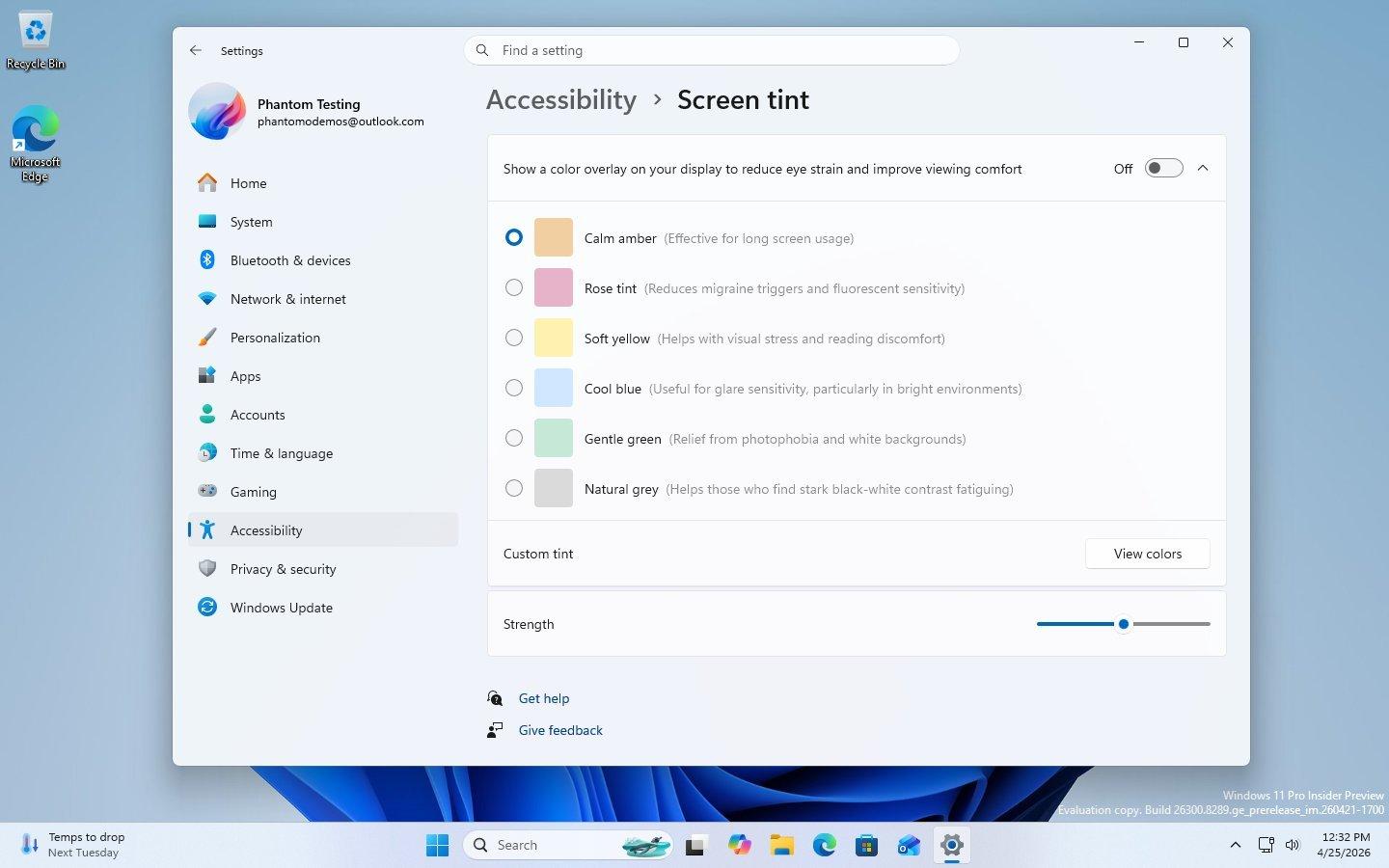
Once enabled, Screen Tint adds a subtle overlay to your display, altering its color profile. Whether you need a gentle sepia for late-night coding or a cool blue for daytime browsing, you can set your preferred tint with just a few clicks. This feature is especially useful for users with light sensitivity or specific visual requirements.
Accessibility at the Forefront
Microsoft is positioning Screen Tint as more than just a cosmetic tweak. It’s part of the broader accessibility suite in Windows 11, aiming to make technology usable for everyone. For people with photophobia or other visual sensitivities, the ability to adjust screen tint can be a game-changer—making work, study, and leisure less taxing on their eyes.
Customization: One Size Doesn’t Fit All
Every user is different—some find dark mode soothing, while others prefer a muted color overlay. With Screen Tint, you’re in control. You can:
- Choose from a variety of color tints
- Adjust the intensity to your liking
- Set schedules for automatic activation
This high level of customization ensures that you can tailor your screen experience to your unique needs, whether you're working late hours or just want to reduce glare during the day.
What This Means for Beginners
If you’re new to Windows 11 or just starting to explore accessibility features, Screen Tint is a fantastic entry point. It’s simple to enable, easy to adjust, and doesn’t require any technical know-how. Plus, experimenting with it can help you better understand how display settings impact your comfort and productivity.
To try it out (once released publicly), just head to Windows Settings > Accessibility > Screen and Color options. Here, you’ll be able to toggle Screen Tint and play around with different settings until you find your sweet spot.
How to Learn More About Screen Customization
Want to dive deeper into screen ergonomics? Start by exploring Windows' built-in accessibility features, such as Magnifier, Color Filters, and Narrator. There are also free online courses and tutorials that teach the science behind eye strain, the principles of UI design for accessibility, and how to optimize your workflow with these tools.
Practical Takeaways for Tech Learners
- Experiment with settings: Use Screen Tint alongside other accessibility options to discover what works best for your eyes.
- Personalize your environment: Don’t settle for default display settings—customize them to fit your needs and boost your comfort.
- Stay updated: Keep an eye on Windows Insider builds and tech blogs to learn about the latest accessibility features as they roll out.
Screen Tint is a promising addition to Windows 11 that puts user comfort and accessibility front and center. As Microsoft continues to innovate, tech learners and everyday users alike can look forward to a more inclusive digital experience.