
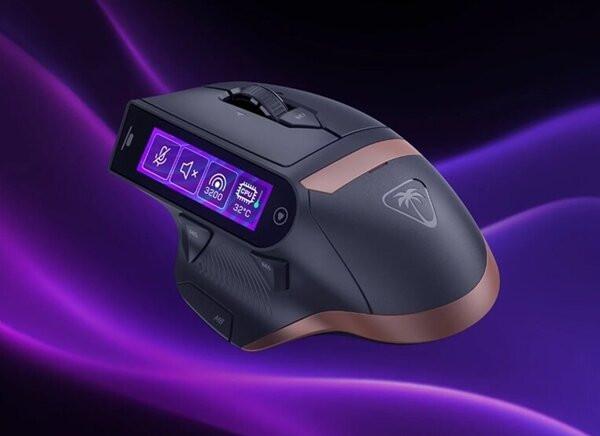
Exploring the Touchscreen Mouse: The Next Step in Peripheral Evolution?
Picture this: you reach for your trusty mouse, but instead of the familiar scroll and click, there’s a shiny touchscreen right where your thumb rests. It sounds futuristic, but is it truly a leap forward, or just another tech fad? As manufacturers strive to push the boundaries of everyday devices, the addition of touchscreens to mice is stirring up both excitement and skepticism in the tech community.
The Rise of Touchscreens in Everyday Devices
Over the years, we've seen touchscreens migrate from smartphones to tablets, laptops, and even kitchen appliances. Once a device type hits a certain level of maturity, adding a display or touchscreen often becomes the next big selling point. The humble mouse, which has remained largely unchanged for decades, is now the latest target for this trend.
With the promise of customizable controls, app integrations, and dynamic shortcuts, a touchscreen mouse could revolutionize the way we interact with our computers. But does every innovation serve a practical purpose, or are we sometimes better off with simplicity?
Potential Benefits of Touchscreen Mice
- Customizable Controls: Touchscreens allow for on-the-fly adjustments and shortcuts that could be tailored to your workflow. Imagine switching between brush sizes in Photoshop or adjusting volume without leaving your mouse.
- Dynamic Feedback: Visual cues on the mouse itself could let you know which mode you’re in, or display notifications, potentially streamlining complex multitasking.
- Reduced Physical Buttons: By replacing physical buttons with a digital interface, manufacturers can offer a cleaner, more minimalistic design and potentially increase the longevity of the device.
Concerns and Challenges for Users
- Accidental Touches: For gamers and power users, unintentional taps could mean the difference between winning and losing. The risk of triggering unwanted actions during high-pressure moments is a valid concern.
- Learning Curve: Adapting to a touchscreen interface on a mouse isn’t as intuitive as it might seem, especially for those used to tactile feedback and muscle memory.
- Battery Life: Adding a display inevitably draws more power, possibly reducing the time between charges or requiring a heavier mouse to accommodate larger batteries.
What This Means for Beginners in Tech
If you’re just starting your journey into tech hardware, the arrival of touchscreen mice offers a unique opportunity to observe innovation in action. It’s a real-world example of how user needs and technological possibilities can sometimes clash. As a beginner, focus on the basics: learn how traditional mice work, what features matter most to you, and only then consider whether experimental features like built-in touchscreens fit your workflow.
Understanding the evolution of hardware can also help you critically evaluate future tech products. Not every new feature is a must-have; sometimes, the tried-and-true methods are still the best.
How to Stay Ahead: Exploring and Learning New Peripherals
- Try Before You Buy: If possible, test out a touchscreen mouse in-store or ask for a demo. Hands-on experience can reveal whether it’s a good fit for your habits.
- Read User Reviews: Early adopters often share valuable feedback on real-world usability, especially regarding accidental touches and ergonomics.
- Keep Up With Trends: Stay informed about new developments in peripheral design. Sites like SupportMeTechs regularly cover emerging hardware and their implications for both beginners and pros.
Practical Takeaways
- Assess Your Needs: Before jumping on the latest trend, consider whether a touchscreen mouse solves a real problem in your daily computing tasks or introduces unnecessary complexity.
- Balance Innovation with Usability: New features are exciting, but make sure they enhance rather than hinder your workflow—especially if you rely on precision, like in gaming or design work.
- Stay Curious and Critical: The tech world is full of bold ideas; learning to evaluate which ones truly benefit you is a key skill for every aspiring tech enthusiast.